A small-business owner needs to answer modest but concrete questions: which pages receive visits, where sessions appear to originate, and whether visitors click a contact action. Pierre Analytics was built around those questions. The result is a functioning tracker, API, database and dashboard, validated locally with fictitious sites and events. It is not evidence of commercial performance or a completed Hostinger deployment.
This is the overview chapter of Building Pierre Analytics: A Small-Business Web Analytics Project. The companion chapters explain the PostgreSQL connection and how the metrics are counted.
The problem and the design boundary
The aim was a dashboard that can show multiple customer sites without mixing their records. A site has an owning organization, approved hostnames, a timezone and a set of event types that count as conversions. A client sees sites through an active organization membership; an administrator manages organizations, sites and access. The public site identifier enables event ingestion, while dashboard reads require an authenticated session and a separate authorization check.
That separation matters more than the visual chart. A website can include a public tracker script, but the public identifier must never act as a password for its reports. The code checks access on dashboard requests using database relationships. Local integration tests exercised access across two fictitious organizations and denied the wrong client’s dashboard request.
How the pieces fit together
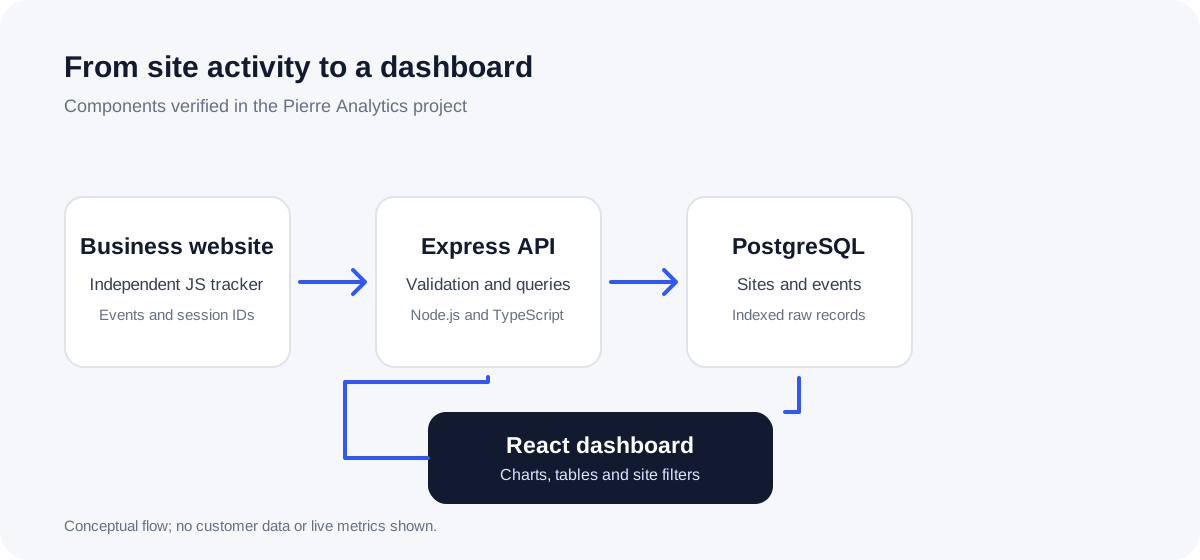
The independent JavaScript tracker runs on an approved website. It emits session_start on a new session, page_view when loaded or when supported browser history navigation occurs, and selected interaction events such as whatsapp_click, phone_click, email_click, form_submit and cta_click. It reads UTM parameters from the landing URL when a session starts. The payload contains a path without query parameters; the tracker does not read form field values. It may miss interactions when scripts are blocked, navigation occurs before delivery, or a site uses patterns the automatic listeners do not cover.
The TypeScript and Express server receives events, validates their shape and site host, and writes them to PostgreSQL. The project also checks request origin and applies an in-process rate limit. Those checks reduce accidental and some abusive traffic; they cannot prove that a non-browser sender is a real visitor. Event IDs are unique per site, so an identical resent event is not counted twice.
PostgreSQL stores organizations, access relationships, sites and events. The dashboard API reads events for a selected site and date range. It calculates totals and series in SQL, then the React frontend renders cards, charts and tables. Vite builds the frontend, while the same Node process serves the API, tracker and built frontend files. The database chapter covers the connection details without exposing a real connection string.
What the dashboard actually shows
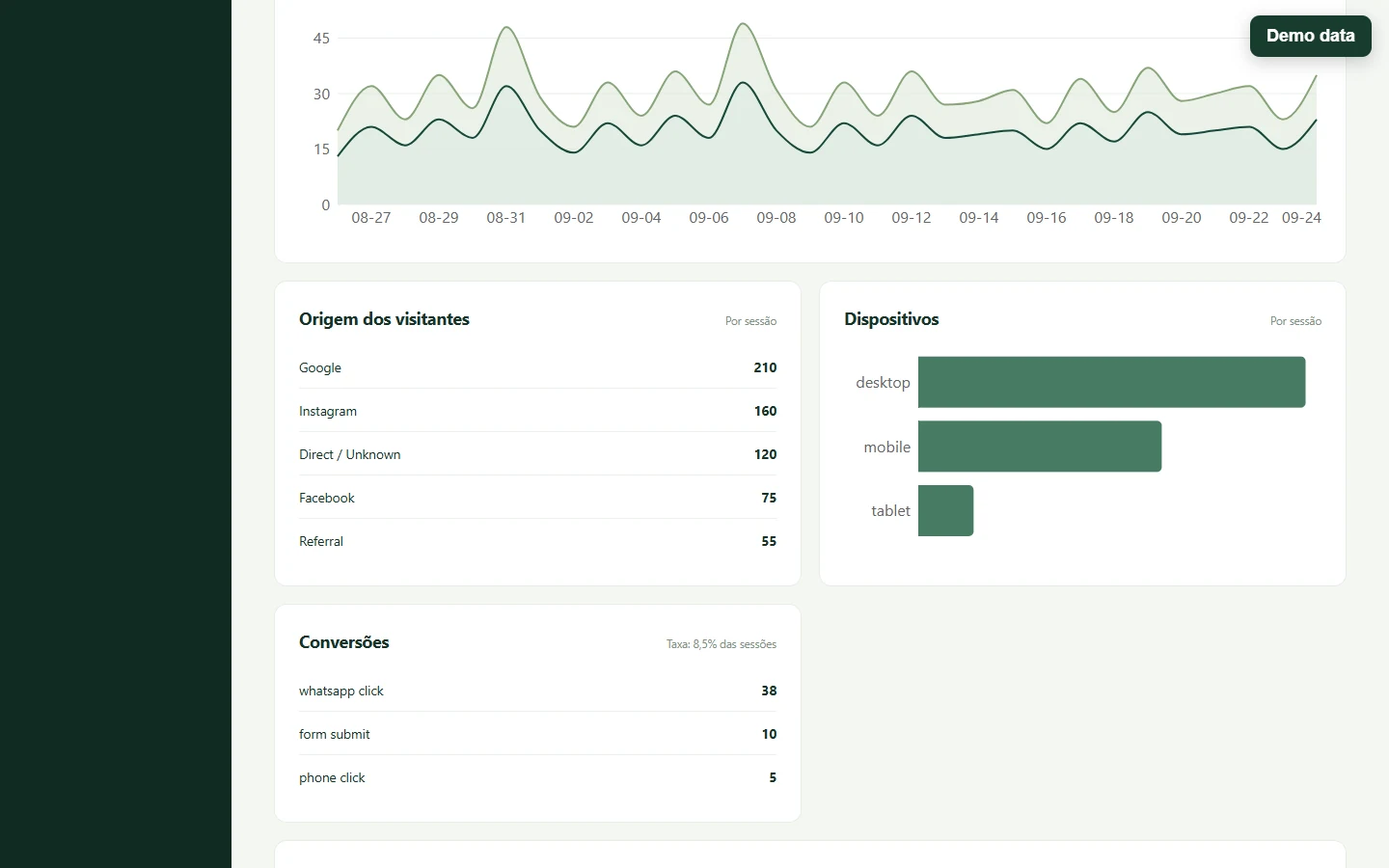
The overview has cards for visitors, sessions, pageviews, WhatsApp clicks, form submissions and configured conversions. It also has a day-by-day chart, traffic-source rows, device categories, conversion types and WhatsApp clicks grouped by session origin. Separate views show campaign names, source channels and page paths. A UTM link builder accepts a destination URL and campaign fields.
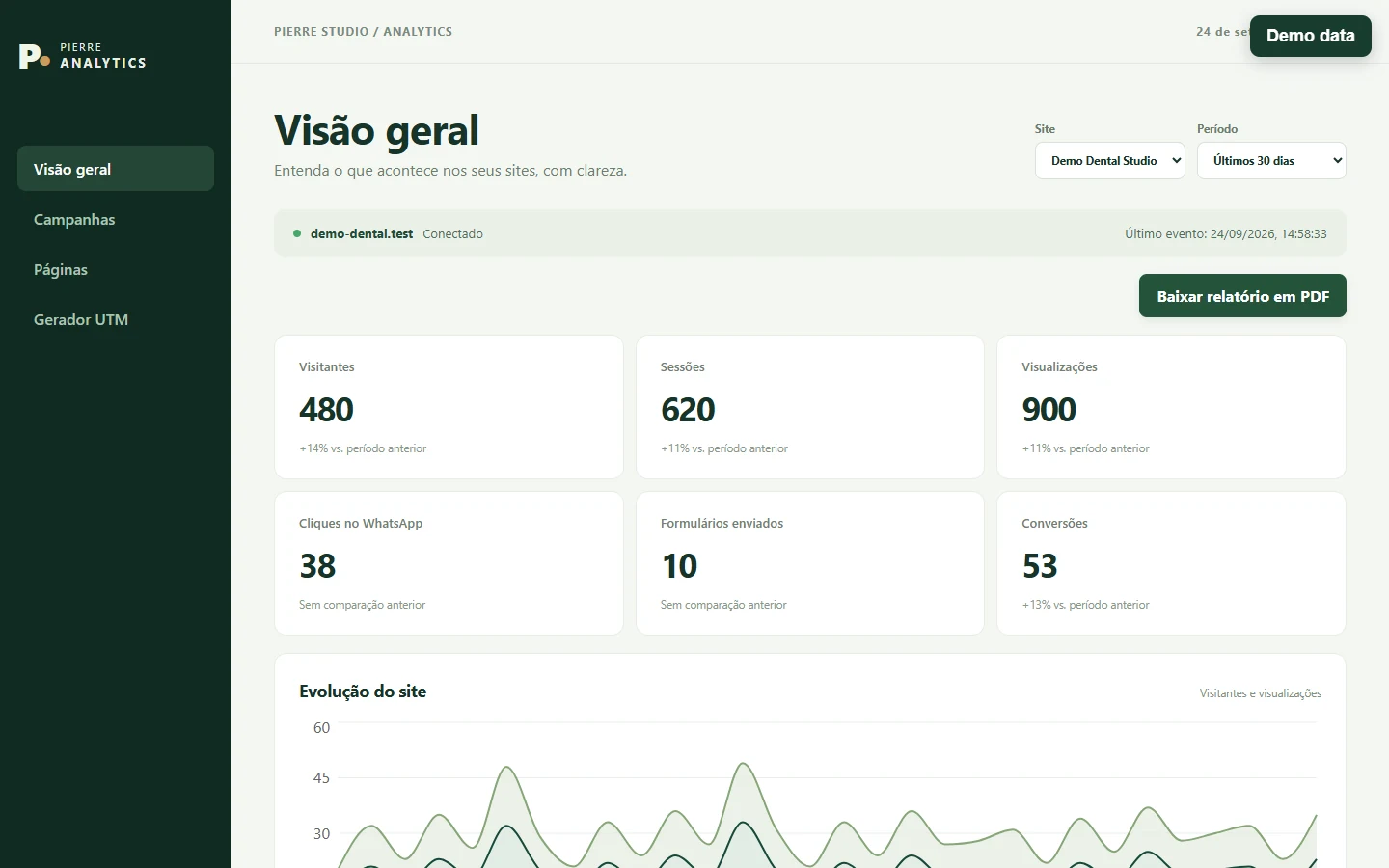
These names describe recorded events, not people or business outcomes. A visitor is a distinct browser-generated ID observed for a site in the selected period. A session is a distinct session ID. A pageview is a stored page_view event. A conversion is any stored event whose type the site has configured as a conversion. The overall conversion count can include multiple actions in one session, so dividing it by sessions can exceed 100%. The WhatsApp-origin table uses a different rate: sessions with at least one WhatsApp click divided by sessions in that origin. Neither a click nor a form submit listener proves a completed conversation or a successfully processed form.
For a worked numerical example and the effect of new tabs and time ranges, read Visitors, Sessions and Pageviews.
What worked
The project’s local delivery record reports an end-to-end test with fictitious sites: a locally run tracker sent events, the API persisted them, and the dashboard read them. The recorded test suite also covered duplicate events, disabled collection, UTMs, conversion counting and separation between customer organizations. This is evidence for the local implementation; it is not a report of live customer traffic.
The architecture kept the tracker small and decoupled from the React dashboard. It also kept report access distinct from collection. The database schema and API use site IDs consistently, and the dashboard requires an explicit site selection and period.
What was difficult
The difficult part was defining metrics precisely enough that the cards could not overclaim. The tracker keeps IDs in sessionStorage, which is scoped to a browser tab’s session. This gives a useful operational count but cannot identify a human across devices or necessarily across tabs. Session origin is fixed at the start; a later campaign parameter does not rewrite it. A general source row groups stored events by source and referrer, while the WhatsApp-specific calculation first selects an origin for each session. These views answer related but different questions.
Local database setup also required the right Supabase connection mode and certificate verification. A successful encrypted connection alone was not treated as proof of server identity. The next chapter explains the setup and validation.
Current limitations and next steps
The implementation has no scheduled retention job. Distinct visitor and session totals query raw events for at most a 90-day range, which may need another approach at higher volume. The rate limit is per process, and browser-origin checks do not prevent all forged events. The tracker does not measure real-time presence; a recent event must not be labeled as a person still online. Legal notices and consent depend on the site using the tracker and need separate review.
An isolated browser demonstration now documents the interface without touching a database. The next engineering checks are an actual hosted smoke test and load behavior under realistic event volume. Use the series hub as the reading path and the metric definitions before interpreting any dashboard total.